Attaching to a running .NET process
Overview
You can attach NProfiler to .NET processes that are already running. However, this comes with some limitations, so it is usually better to use one of the other profiling session types:
- The profiled process must use at least .NET 4.
- Only the sampling profiling mode is supported.
- It is not possible to distinguish between CPU and blocking time.
Step by step
- Start NProfiler. The session configurator opens automatically. Alternatively, click Home → Session → New in the ribbon to open the session configurator.
- Select the application type “Attach to Running .NET 4+ Process” at the top.
- Configure the desired application options.
- Finally, configure general profiling options in the “Profiling Options” section.
- Click “Start”.
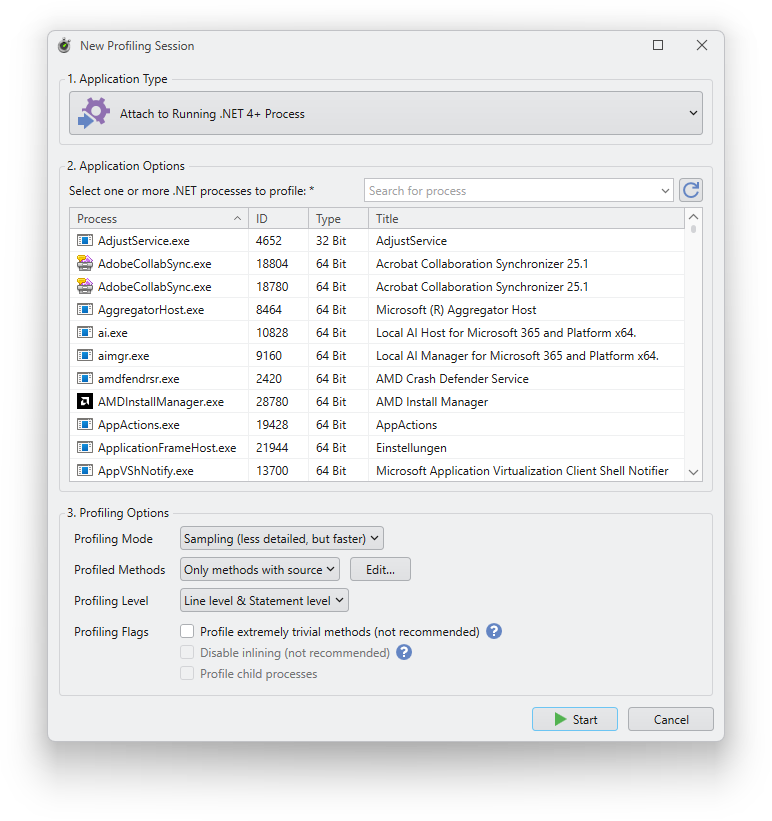
Application options
Process list
Required. Select one or more processes to which NProfiler should be attached. These must be processes that have loaded .NET runtimes. You can use the search box above the process list to search by name, title, or process ID. You can also sort the list by clicking on the column headers.